
Forbes India Leader Recognition
e.preventDefault(); // Prevent form submission input.blur(); // remove focus input.value = ""; // optional: clear the input

How to send push notifications to android devices in Nodejs

How to send push notifications to android devices in Nodejs

Featured Image

In this blog, we will explore how to send push notifications to android devices from the Nodejs applications.

Push notifications are the notification which pops up on the mobile screen using fcm messages.

Firebase Cloud Messaging is a used to that helps to safely deliver messages at no cost.

First, we need to sign in at firebase using a Google account. There will be a ‘Go to console’  link, you need to click on the link and will be redirected to the dashboard.

If you don’t have any project, click on ‘create project’.
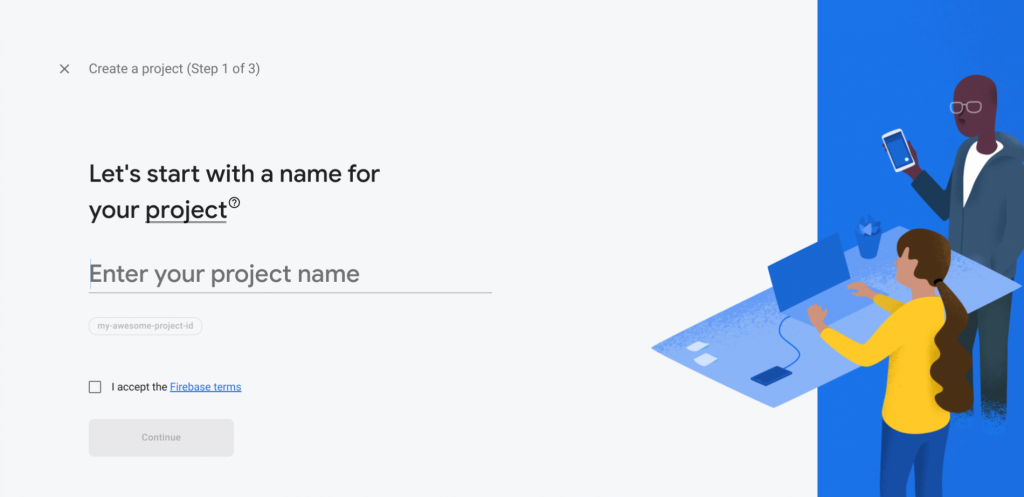
You need to provide the name of the project, accept the terms, and do all the necessary steps. After completing it, a new project will be created and will be redirected to the dashboard.

We are done creating the firebase account.

To send the push notification to an android device, we will need the following:

  • FCM Server Key
  • Registration Token

FCM Server Key:

FCM Server Key will be generated automatically when we create a firebase project. Go to project settings and go to cloud Messaging tab and Inside project credentials, you can find server key.

We need to copy the ‘Server Key’ value and use it while sending push notifications.

Registration Token:

Registration Token will be generated from the mobile application and sent to the NodeJS backend using the API from where we will send the push notification.It is used to inform the Nodejs backend to which device it should send.

Nodejs Backend

In the Node Js project, you can use the ‘fcm-node’ package for sending push notifications to the android device.

  • Installation of fcm-node
    $ npm install fcm-node
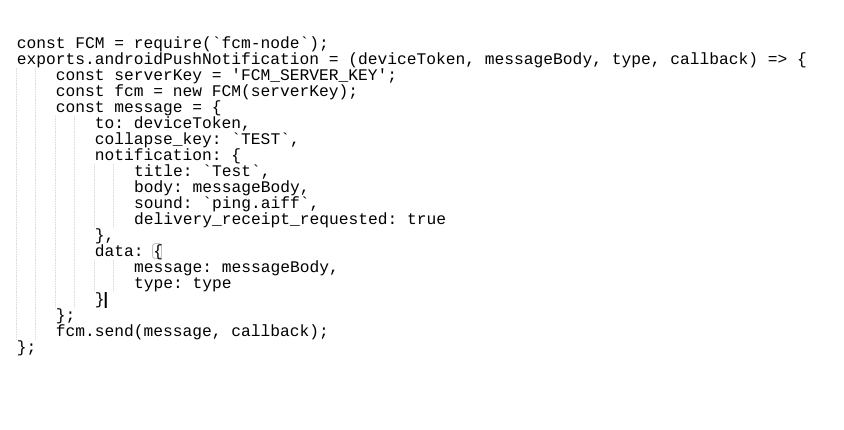
  • Copy the fcm server key from the firebase account and pass the key to the FCM constructor.
  • Create a message object and invoke the send() function
  • Message object:
    • to:- provide the registration token (device token)
    • collapse key:-  provide the collapse key
    • Notification object:- create a notification object providing the title of the notification (will be shown on mobile), message body, sound, and delivery receipt boolean value.
    • We can send only notification or only data or include both (data or notification)

Example Code:
How to send push notifications to android devices in Nodejs

Related Posts

Latest Posts

  • All Posts
  • AI Powered Knowledge
  • ai/ml
  • CEO India Magazine
  • CMMI level 5 Certification
  • e-learning
  • Fintech
  • gaming
  • Generative AI
  • healthcare
  • manufacturing
  • News
  • OTT
  • Portfolio
  • supply chain
  • travel and hospitality
  • Tudip's AI Hackathon
  • Voxlearn Enterprises
    •   Back
    • Android
    • iOS
    • Java
    • PHP
    • MEAN
    • Ruby
    • DotNet
    • IoT
    • Cloud
    • Testing
    • Roku
    • CMS
    • Python
The Future of Workplace Learning: AI-Powered Knowledge on Demand

The Future of Workplace Learning: AI-Powered Knowledge on Demand

June 12, 2026

A few months ago, I was sitting in a meeting with a team lead who looked genuinely frustrated. Not because…

Read More
We Built VoXlearn Because Enterprise Training Was Broken: Here’s What We Did About It

We Built VoXlearn Because Enterprise Training Was Broken: Here’s What We Did About It

June 12, 2026

If you’ve ever sat through an end-of-quarter training report and thought, “We spent all that time and money, and this…

Read More
We Did It Again: Tudip Successfully Renews Its CMMI Level 5 Certification

We Did It Again: Tudip Successfully Renews Its CMMI Level 5 Certification

June 9, 2026

Nobody around here needed a memo to know something worth celebrating had happened. The message from the CMMI Institute said…

Read More

India

Plot No. 11/2, Phase 3, Hinjewadi Rajiv Gandhi Infotech Park, Pune, India – 411057.
info@tudip.com
+91-96-8990-0537

United States

1999 S. Bascom Ave Suite 700, Campbell CA. 95008, USA.
info@tudip.com
+1-408-216-8162

Canada

64 Caracas Road North York, Toronto Ontario M2K 1B1, Canada.
info@tudip.com

Mexico

Calle Amado Nervo #785 Interior B Colonia Ladron De Guevara 44600 Guadalajara, Jalisco, Mexico.
info@tudip.com

Singapore

77 High Street, #10-12B High Street Plaza, Singapore 179433.
info@tudip.com

Colombia

Cra. 9 # 113-53 Of. 1405 Bogotá D.C., Colombia.
info@tudip.com

UAE

Tudip Information Technologies L.L.C Office No 109, ABU HAIL BUILDING 13, Abu Hail, Dubai, UAE.
info@tudip.com

Nigeria

22 Kumasi Crescent, Wuse 2, Abuja, Nigeria.
info@tudip.com