DAST (dynamic application security testing) is a form of black-box security testing in which an application is attacked from the outside. When a program is running, It is executed when a program is in operation. DAST analyses the application while it is operating and attempts to modify it in order to find security flaws. This dynamic test simulates attacks against a web application and examines the program’s responses to see if it is secure.
The DAST can be used in production and testing is carried out in a QA environment.
The DAST scanner looks for various types of vulnerabilities like input/output validation, Specific Application problem and mistakes in server configuration.
The common application vulnerabilities in recently tested application are:
- Cross-Site scripting
- SQL Injection
- Denial-of-service
- Code execution
- Cross-site-request forgery
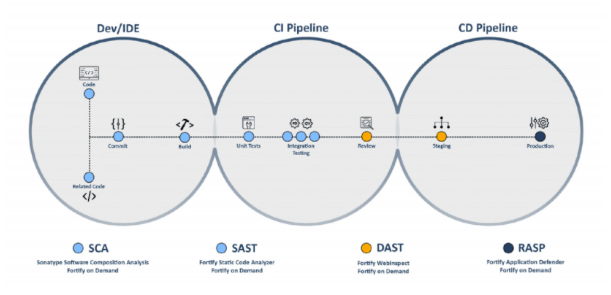
Different types of DAST testing tools.
- Netsparker
- Acunetix
- PortSwigger.
- Detectify.
- AppCheck Ltd.
- Hdiv Security.
- AppScan.
- Checkmarx.
How does DAST work
A DAST scanner scans a running application for vulnerabilities and sends out automatic notifications if it detects weaknesses that allow for SQL injections, Cross-Site Scripting (XSS), and other attacks. DAST tools can discover runtime vulnerabilities that SAST tools can’t since they’re designed to work in a dynamic context.
A DAST scanner, in the context of a building, might be compared to a security guard. Instead of simply checking to see if the doors and windows are secured, this guard goes a step further by attempting to physically enter the premises. The guard may attempt to pick locks on doors or smash windows.After completing this examination, the guard may return to the building management and explain how he was able to get access to the structure. In the same manner, a DAST scanner actively attempts to find vulnerabilities in a live environment so that the DevOps team understands where and how to address them.
Difference between DAST and SAST
DAST targets the application from the outside in, targeting a software that might be used by a malicious user. When a DAST scanner conducts these attacks, it looks for results that are not part of the expected result set and detects security flaws.
SAST analyzes the static environment such as an application’s source code. It examines the programme from the “inside out,” looking for flaws in the code.
To increase the strength of security posture, it is better to use SAST and DAST together. You may get a full picture of vulnerabilities by using this uniform taxonomy across testing techniques.
DAST Pros and Cons
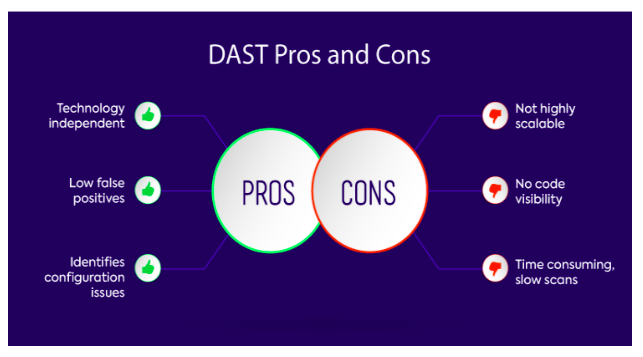
Pros
- DAST is a high-precision defect and server misconfiguration detector
- It is not language and platform specific so the DAST tool runs for all applications.
- DAST has a lower false positive rate than other application security testing tools, according to the OWASP Benchmark Project.
Cons
- DAST only examines web apps and is unable to detect problems in business logic. Because doing a dynamic scan takes time, you should schedule it to run overnight.