
Shared VPC
Shared VPC provides a special feature to the organization that they can connect different projects to the common Virtual Private Cloud (VPC) network, the resources of the multiple projects can communicate with each other efficiently and securely by internal IPs of the VPC network. When we will use Shared VPC, we will make one project as a Host Project and we will attach multiple projects to it as a Service Project.
How does Shared VPC in Kubernetes Engine works?
In Kubernetes engine, the first step is you need to set up the correct IAM roles to the service accounts. We have to provide cluster admin role to the Service projects to create Kubernetes Engine clusters and the compute.networkUser and container.hostServiceAgentUser roles to the host project administrator for allowing the service project’s service accounts to use specific subnetworks and to perform networking administrative actions to manage Kubernetes Engine clusters. After providing the correct IAM permissions for service accounts to the service and host projects, the cluster admin can create a number of Compute Engine resources and cluster in any of the service projects. Host project Can contains one or more network resources while the service project(s) map to the different departments or teams in your organization
Kubernetes Engine clusters in service projects will need to be configured with a primary CIDR range (from which to draw Node IP addresses), and two secondary CIDR ranges (from which to draw Kubernetes Pod and Service IP addresses). The following diagram illustrates a subnet with the three CIDR ranges from which the clusters in the Shared VPC are carved out.
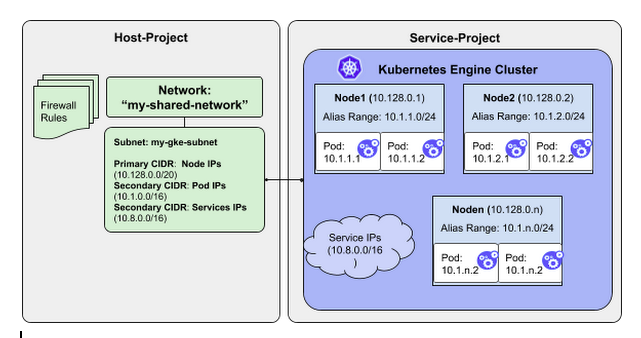
Steps to execute the Shared VPC
To start with a shared VPC you will need 3 projects, first as a host project and other as a service project. Also make sure that project has a name, an ID, and a number.
- Find your project IDs and numbers
- Enable the Google Kubernetes Engine API in your projects
- Create a network and two subnets
- Enable shared VPC and granting roles
- Grante the Host Service Agent User role
- Verify usable subnets and secondary IP ranges
- Create a cluster in your first service project
- Create a cluster in your second service project.
- Create firewall rules
- Connect a node using SSH
- Pinging between nodes
- Create additional firewall rules
- Create a private cluster in a shared VPC
- Reserve IP addresses
Conclusion
There are a lot of Benefits of Shared VPC for Google Kubernetes Engine for the organization. Which helps organization in many ways like,
- Sharing of common resources
- Security
- Billing
- Isolation and support for multi-tenant workloads