



Introduction
Sentiment analysis makes use of textual content evaluation, biometrics, computational linguistics, and natural language processing to identify, extract, quantify, and take a look at affective states and subjective information. We can name sentiment analysis as opinion mining or emotion AI. Sentiment analysis will provide the opinion within a requested text. The API returns two values: The score shows the emotional learning of the text from -1 to +1, with 0 being neutral. The magnitude gives the emotion power. It is helpful in tracking social media as it helps one to obtain an understanding of the larger public opinion behind those issues.
Authenticate by using API Key
To perform sentiment analysis, we have to generate an API key first to authenticate. The security key will allow us to get, send or pull requests from the service.
In the GCP console, click APIs & Services > Credentials. The credentials are used to access our enabled APIS.
Click + Create credentials to create and select the API key from the dropdown menu.
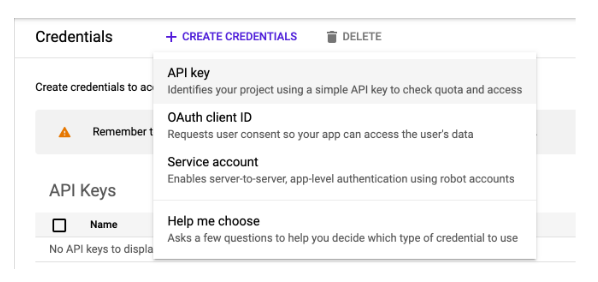
Our API key has been successfully created now. Copy the generated API key to use in our application. We can also copy the API key by visiting the APIs & Services > Credentials page.
To make a sentiment analysis request, we required one Compute Engine instance to SSH into it. Save the API key by exporting it by using the following command.
export API_KEY=<Copied API Key>
Sentiment Analysis in Natural Language API
Natural Language API is used to perform sentiment analysis on text. We have to create a JSON file to include the above text.
Use any editor to create a JSON file. Here we are using the nano editor to create a call.json file.
nano call.json
Add the below code in the file and save it. To calculate sentence offsets we used the encoding type.
 {

  "document":{

    "type":"PLAIN_TEXT",

    "content":"Lord of the Rings is the best book. Everyone should read it once."

  },

  "encodingType": "UTF8"

}
Now we have to submit the request by using the curl command to the APIs analyzeSentiment endpoint.
curl "https://language.googleapis.com/v1/documents:analyzeSentiment?key=${API_KEY}" \

  -s -X POST -H "Content-Type: application/json" --data-binary @call.json > response.json
As a result, the response.json file will be created. Review the file using any editor.
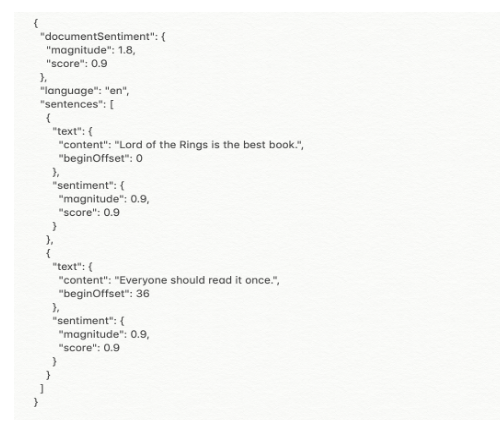
In response, you spot varieties of sentiment values:
- Sentiment for the complete document.
- Sentiment broken down by sentence.
The sentiment approach returns two values:
- Score – Number from -1.0 to 1.0, it shows how positive or negative the statement is.
- Magnitude – The number that gives the weight of the emotion conveyed in the sentence, regardless of whether positive or negative, starting from 0 to infinity.