
Forbes India Leader Recognition
e.preventDefault(); // Prevent form submission input.blur(); // remove focus input.value = ""; // optional: clear the input

What is SSH tunneling and reverse port forwarding?

What is SSH tunneling and reverse port forwarding?

Featured Image

Introduction

SSH tunnel consists of an encrypted tunnel which is created through a SSH protocol. This tunnel can be used to transfer unencrypted traffic through an encrypted channel over the network. For example we can use a SSH tunnel to securely transfer files.

SSH tunnels are also used for bypassing firewalls that deny certain internet services.

Port Forwarding

SSH tunnels can be created in various ways depending on which type of port forwarding is used:
There are three types of port forwarding:

  1. Local port forwarding
  2. Remote port forwarding
  3. Dynamic port forwarding

Tunnelling with Local port forwarding

Lets say, yahoo.com is being blocked using a proxy filter at your college. An SSH tunnel can be used to bypass this restriction. Let’s give name to my machine at college as “college-pc” and my home machine as “home-pc” (SSH server should be running on “home-pc”)

To create the SSH tunnel that is executed from “college-pc” use the below command:

ssh -L 9090:facebook.com:80 <user>@home-pc

-L indicates that this is local port forwarding

Now SSH client at college-pc is connected to SSH server running at “home-pc”. This is also binding port 9090 of college-pc to listen to all local requests thus creating an SSH tunnel between “college-pc” and “home-pc”.

At the home-pc side, It will create a connection to yahoo.com at port 80. home-pc will think of how to connect to yahoo rather than college-pc.

SSH_tunneling_01

Now we can browse yahoo.com at work using localhost:9090
The home-pc will act as a gateway.

Reverse Tunnelling with remote port forwarding

Let’s say you want to connect to an internal university website from the home-pc system.

The university firewall will block its incoming traffic. We have to use SSH reverse tunnelling here.

ssh -R 9090:intra-site.com:80 <user>@home-pc (Executed from college-pc)

We will use the option -R for reverse tunneling.

Once done, The SSH client at college-pc will connect to the SSH server running at home-pc. Then the server will bind port 9090 on home-pc to listen to all incoming requests.

By visiting localhost:9090 at home-pc, the college-pc will create a connection to the internal site and give back the response to home-pc via the created SSH channel.
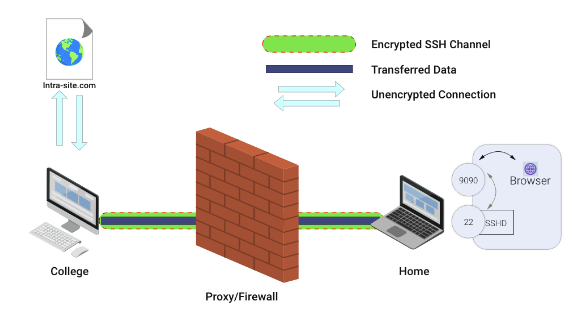

SSH_tunneling_02

Related Posts

Latest Posts

  • All Posts
  • ai/ml
  • CEO India Magazine
  • CMMI level 5 Certification
  • e-learning
  • Fintech
  • gaming
  • Generative AI
  • healthcare
  • manufacturing
  • News
  • OTT
  • Portfolio
  • supply chain
  • travel and hospitality
  • Tudip's AI Hackathon
    •   Back
    • Android
    • iOS
    • Java
    • PHP
    • MEAN
    • Ruby
    • DotNet
    • IoT
    • Cloud
    • Testing
    • Roku
    • CMS
    • Python
We Did It Again: Tudip Successfully Renews Its CMMI Level 5 Certification

We Did It Again: Tudip Successfully Renews Its CMMI Level 5 Certification

June 9, 2026

Nobody around here needed a memo to know something worth celebrating had happened. The message from the CMMI Institute said…

Read More
CEO India Magazine Features Dipti Agrawal: The Woman Behind Intelligent Enterprise Solutions

CEO India Magazine Features Dipti Agrawal: The Woman Behind Intelligent Enterprise Solutions

June 9, 2026

There are moments at work that just stop you in your tracks. Not the big quarterly reviews or the product…

Read More
39 Teams, One Afternoon, Countless Ideas: A Look Inside Tudip’s AI Hackathon

39 Teams, One Afternoon, Countless Ideas: A Look Inside Tudip’s AI Hackathon

June 9, 2026

More than 120 employees across 39 teams came together during Tudip's AI Hackathon to explore how artificial intelligence can solve…

Read More

India

Plot No. 11/2, Phase 3, Hinjewadi Rajiv Gandhi Infotech Park, Pune, India – 411057.
info@tudip.com
+91-96-8990-0537

United States

1999 S. Bascom Ave Suite 700, Campbell CA. 95008, USA.
info@tudip.com
+1-408-216-8162

Canada

64 Caracas Road North York, Toronto Ontario M2K 1B1, Canada.
info@tudip.com

Mexico

Calle Amado Nervo #785 Interior B Colonia Ladron De Guevara 44600 Guadalajara, Jalisco, Mexico.
info@tudip.com

Singapore

77 High Street, #10-12B High Street Plaza, Singapore 179433.
info@tudip.com

Colombia

Cra. 9 # 113-53 Of. 1405 Bogotá D.C., Colombia.
info@tudip.com

UAE

Tudip Information Technologies L.L.C Office No 109, ABU HAIL BUILDING 13, Abu Hail, Dubai, UAE.
info@tudip.com

Nigeria

22 Kumasi Crescent, Wuse 2, Abuja, Nigeria.
info@tudip.com