Forbes India Leader Recognition
e.preventDefault(); // Prevent form submission input.blur(); // remove focus input.value = ""; // optional: clear the input

What is VSTS and its core importance?

What is VSTS and its core importance?

Featured Image

What is VSTS and its core importance?

VSTS stands for – “Microsoft Visual Studio Team Services (VSTS)”, previously it’s referred to as “Visual Studio Online”. It is the Project Management Tool supported within the type of versioning the code, creating the components and their releases, managing the process of development, and managing Bugs, Task, Feature, Test cases and PBI (i.e. Product Backlog Item). VSTS services are available on the web,and can be easily employed by teams that are distributed across multiple locations, without having any additional cost of VPN and overheads of security.

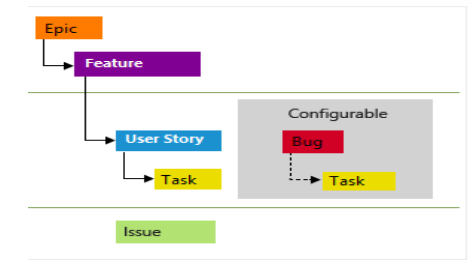
We can create a Bug, Features, Epic and PBI’s by using the VSTS.-

Please find the below diagram:
VSTS_01

Queries:

In VSTS, the foremost important part is Queries, Whatever bugs, tasks, PBI’s and features which you’ve got created, if you wish to determine those you’ll easily determine through queries.

Queries are one in every of the Work Items present within the VSTS. We will create, Manage, update and save the Queries in VSTS.
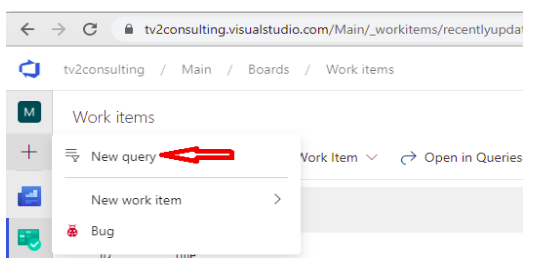
 

VSTS_02

We can tag the queries as favorites in VSTS. We will specify all the reported bugs, Created tasks, test cases, PBI’s using the Queries.

In queries, there are different types of fields –

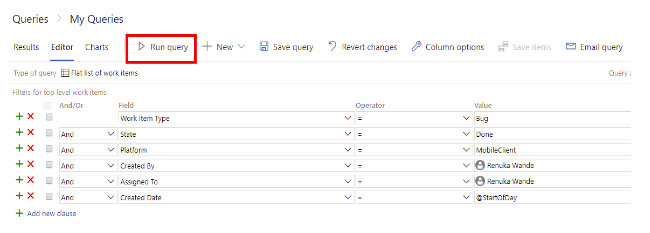
  1. If I would like to find all the Work Items which were created by Me or Assigned to Me, we will simply add the created by – @Me and Assigned to – @Me.
  2. There are multiple sorts of operations we will use in VSTS –
    • Equal To (=)
    • Contains
    • Does Not Contain
    • Group
    • Not In Group
    • In

We can add different fields like –

  1. Work Item Type – would be Bug, Task, PBI, Test case, etc.
  2. State – the state of the Work Item Type, it’d be New, Resolved, Done, etc.
  3. Created By
  4. Assigned To
  5. Created Date

VSTS_03

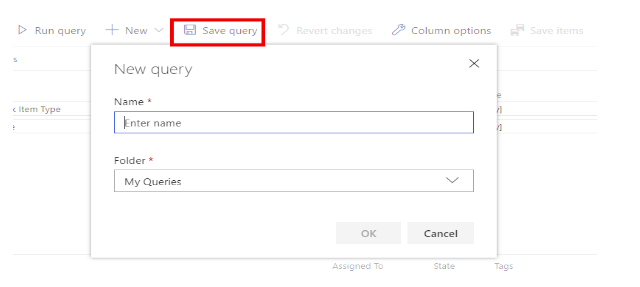
We need to add these filters and just have to click on the Run Query button. We will get all the related Bugs/tasks by using this question. We can save this query by clicking on the button Save Query. To save lots of the Query, we have to present the name to the Query – “Bugs Reported by Me”  and Folder name where I would like to save lots of that question.
VSTS_04

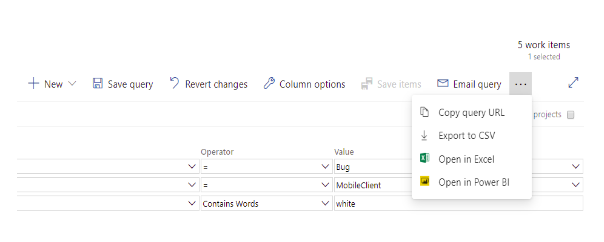
We can also copy the Query Url to send over any communication medium. To Copy the Query Url we just need to add the three dots (…) present in the left hand side. Select the 1st option as “Copy URl”. We can also Export all the items in the CSV file by clicking on “Export to CSV” option.

VSTS_05


Related Posts

Latest Posts

  • All Posts
  • AI Powered Knowledge
  • ai/ml
  • CEO India Magazine
  • CMMI level 5 Certification
  • e-learning
  • Fintech
  • gaming
  • Generative AI
  • healthcare
  • manufacturing
  • News
  • OTT
  • Portfolio
  • supply chain
  • travel and hospitality
  • Tudip's AI Hackathon
  • Voxlearn Enterprises
    •   Back
    • Android
    • iOS
    • Java
    • PHP
    • MEAN
    • Ruby
    • DotNet
    • IoT
    • Cloud
    • Testing
    • Roku
    • CMS
    • Python
The Future of Workplace Learning: AI-Powered Knowledge on Demand

The Future of Workplace Learning: AI-Powered Knowledge on Demand

June 12, 2026

A few months ago, I was sitting in a meeting with a team lead who looked genuinely frustrated. Not because…

Read More
We Built VoXlearn Because Enterprise Training Was Broken: Here’s What We Did About It

We Built VoXlearn Because Enterprise Training Was Broken: Here’s What We Did About It

June 12, 2026

If you’ve ever sat through an end-of-quarter training report and thought, “We spent all that time and money, and this…

Read More
We Did It Again: Tudip Successfully Renews Its CMMI Level 5 Certification

We Did It Again: Tudip Successfully Renews Its CMMI Level 5 Certification

June 9, 2026

Nobody around here needed a memo to know something worth celebrating had happened. The message from the CMMI Institute said…

Read More

India

Plot No. 11/2, Phase 3, Hinjewadi Rajiv Gandhi Infotech Park, Pune, India – 411057.
info@tudip.com
+91-96-8990-0537

United States

1999 S. Bascom Ave Suite 700, Campbell CA. 95008, USA.
info@tudip.com
+1-408-216-8162

Canada

64 Caracas Road North York, Toronto Ontario M2K 1B1, Canada.
info@tudip.com

Mexico

Calle Amado Nervo #785 Interior B Colonia Ladron De Guevara 44600 Guadalajara, Jalisco, Mexico.
info@tudip.com

Singapore

77 High Street, #10-12B High Street Plaza, Singapore 179433.
info@tudip.com

Colombia

Cra. 9 # 113-53 Of. 1405 Bogotá D.C., Colombia.
info@tudip.com

UAE

Tudip Information Technologies L.L.C Office No 109, ABU HAIL BUILDING 13, Abu Hail, Dubai, UAE.
info@tudip.com

Nigeria

22 Kumasi Crescent, Wuse 2, Abuja, Nigeria.
info@tudip.com