
Goals of Magento 2 Platform:
- Improved Performance and Scalability
- High Quality and tested code.
- Simplify Integrations.
- Easier Upgrades.
Magento 2 Components (Platform and Architecture):
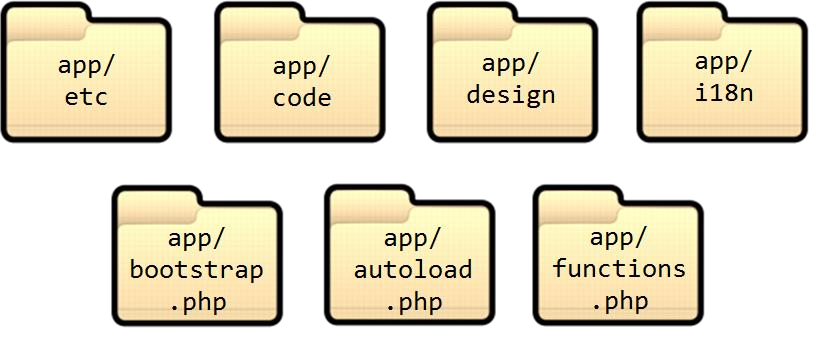
- Configuration: The main configuration of Magento 2 framework reside in app/etc/ folder. It contains env.php, config.php etc. files.
- Framework: It resides under /lib/internal/Magento/Framework which contains framework classes.
- Modules: Magento 2 modules located under app/code/Magento which has business logic.
- Command-line Tool: This is the important utility of the Magento framework located inside bin/magento.
- Themes: Themes contain static content belongs to the theme and located inside app/design folder.
File Types in Magento 2:
- Configuration files (XML files and a few php files).
- PHP classes
- Layout instructions (*.xml files)
- Templates (*.phtml files)
- Javascript modules (*.js files)
- Javascript templates (*.html files)
- Static Assets (CSS, images,..)
Magento 2 folder structure:
Magento 2 folder structure is much more different from Magento 1.x. Following are the folder structure of Magento 2.
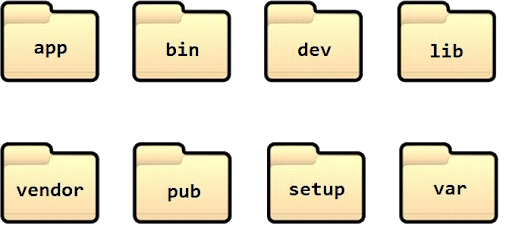
/app: This folder contains core files of Magento 2 including modules, configuration and themes files.
/bin: It contains Magento 2 CLI feature. It helps you in installing modules, upgrading, reindexing and compiling, etc.
/dev: It contains tools for a developer such as MTF (Magento Test Framework)
/lib: This directory contains library files other than Magento 2 core files.
/phpserver: It contains routers.php file.
/pub: This directory contains all generated static files and media as well as it contains all publicly accessible files.
/setup: It contains several important packages like performance toolkit etc.
/var: This directory contains logs, raw cache files, sessions, and reports.
/vendor: This directory contains the packages generated from composer.json files.
Following is the app/ folder structure image.
Magento 2 Theme Structure:
Default Magento 2 theme location is at app/design/frontend/. Theme directory contains typically following described file as given in the below image.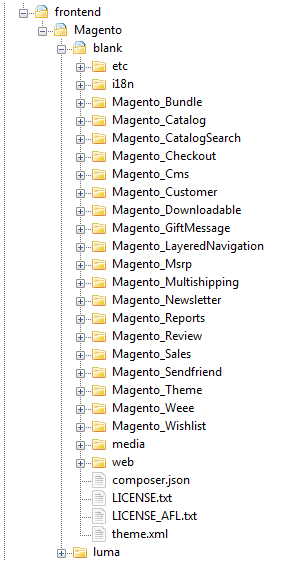
- etc Directory: It contains a view.xml file which actually used to configure image for all storefront product images and thumbnails.
- i18n Directory: Contains CSV files for locales.
- media Directory: Contains images for that theme.
- web Directory: Contains CSS and JS files for the theme.
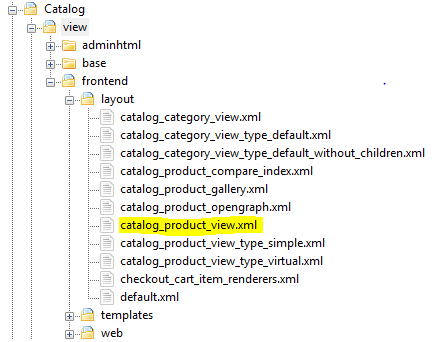
Apart from these directories all other folders/directories inside theme are to extend or override the default module specific theme. For example, Magento_Catalog module present inside a blank directory, please check out below image.
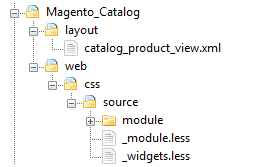
Here it contains a catalog_product_view.xml file which actually extended from the parent catalog module located inside Magento/Catalog/view/layout/frontend/layout/catalog_product_view.xml given below.
Magento 2 Module structure:
It is a directory containing blocks, controllers, models, helpers etc that are related to the specific business feature. Modules reside under app/code/ directory as explained below briefly.
<Magento Root>/app/code/Vendor/Module/
 | registration.php
 | composer.json
 |
 /etc/
 module.xml
- Web services: Apache 2.2 or 2.4 Nginx 1.8
- Database Engine: MySQL 5.6 MariaDB
- PHP: 5.6.x 5.5.x, where x is 22 or greater 7.0.2 up to 7.1.0, except for 7.0.5 . Not work on 7.0.5
Here is the link which shows easy step by step installation for Magento 2 https://www.mageplaza.com/kb/how-to-install-magento-2.html
Modes in Magento 2: There are three primary modes in Magento 2:
- Developer
- Production
- Default
Developer Mode: It enables automatic code compilation, enables enhanced debugging, provide verbose logging and it always intended for development only.
Production Mode: This mode usually used for deployment on a production system. It prevents automatic code compilation, does not show exceptions to the user and serves static files from cache type only.
Default mode: It is the default mode of the platform which enables to deploy Magento application on a single server without changing any settings. These are the basic and essentials concept regarding Magento 2 such as features, the basic structure of Magento platform, the file system of Magento 2, Magento 2 theme structure, installation of Magento 2, and modes of Magento 2 platform.
To deep dive into Magento 2 platform please go with the below links. https://devdocs.magento.com/guides/v2.0/extension-dev-guide/bk-extension-dev-guide.html