

✕
Forbes India Leader Recognition
e.preventDefault(); // Prevent form submission input.blur(); // remove focus input.value = ""; // optional: clear the input

Auditing Web Application Using Google Lighthouse

Auditing Web Application Using Google Lighthouse

Featured Image

What is Google Lighthouse?

Google Lighthouse is an automated open source tool used to check the quality, performance and correctness of progressive web applications. It helps the developer to know every possible way to improve a website’s function, performance, loading, SEO, accessibility. It is both available as a Chrome extension and on the Chrome Developer tools. The user can also run the Lighthouse through the Command line.

Google Lighthouse helps to improve the performance of the application and runs several tests to establish how a web application can crawl to the top search results. The SEO test result describes that anyone who develops the web application should make the required changes suggested by the Lighthouse test report.

How to add Lighthouse as a Chrome extension?

  • Go to Chrome browser
  • Go to More Tools
  • Click on the Hamburger menu
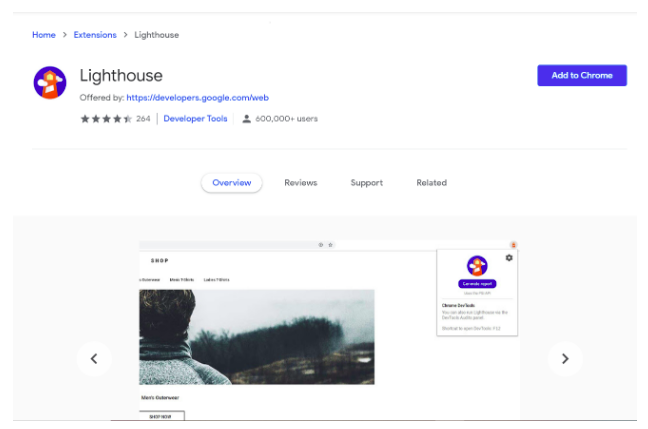
  • Click on Open Chrome Web Store
  • Search for Lighthouse extension
    Auditing Web Application Using Google Lighthouse
  • Click on Add to Chrome
    Auditing Web Application Using Google LighthouseAfter installing the extension, the Lighthouse icon will appear on the upper right corner.
    Auditing Web Application Using Google Lighthouse

How to run Lighthouse to audit your website?

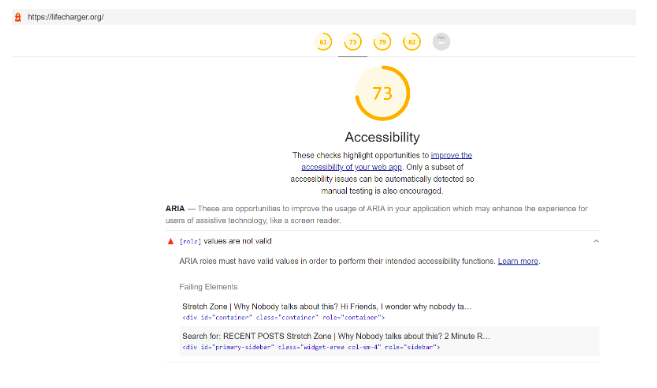
  • Go to any website like lifecharger.org
  • Click on Lighthouse icon
  • Click on Settings icon
    Auditing Web Application Using Google Lighthouse
  • Check the checkbox to select audit categories.
  • Click on Generate report

The Report generated can be saved and the user can refer whenever needed.
Auditing Web Application Using Google Lighthouse

How to read a Lighthouse report?

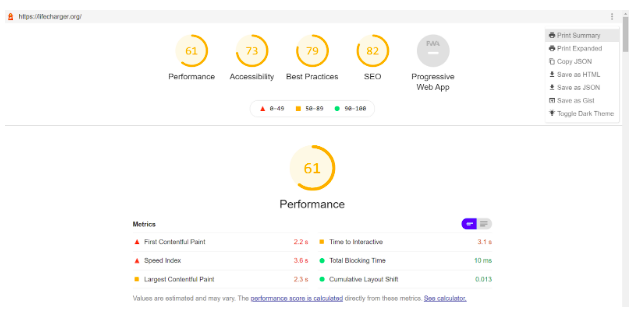
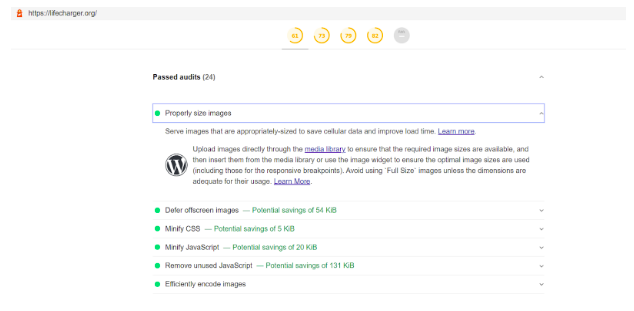
The Lighthouse report contains the performance of the Web Application against the four audit categories. The report depicts the standards not met by the application. It contains metrics against each attribute. The user can go to the individual category and see the in depth analysis of the application. The audits are displayed in two categories: Passed audits and Failed audits.

Passed audits:
Auditing Web Application Using Google Lighthouse

Failed audits:

Auditing Web Application Using Google Lighthouse

Related Posts

Latest Posts

  • All Posts
  • AI Powered Knowledge
  • ai/ml
  • CEO India Magazine
  • CMMI level 5 Certification
  • e-learning
  • Fintech
  • gaming
  • Generative AI
  • healthcare
  • manufacturing
  • News
  • OTT
  • Portfolio
  • supply chain
  • travel and hospitality
  • Tudip's AI Hackathon
  • Voxlearn Enterprises
    •   Back
    • Android
    • iOS
    • Java
    • PHP
    • MEAN
    • Ruby
    • DotNet
    • IoT
    • Cloud
    • Testing
    • Roku
    • CMS
    • Python
Artificial Intelligence in Healthcare

Artificial Intelligence in Healthcare

September 23, 2026

Explore how artificial intelligence in healthcare is transforming clinical decision-making, and patient care .

Read More
AI in Manufacturing: Machine Intelligence  Meets Industrial Innovation

AI in Manufacturing: Machine Intelligence Meets Industrial Innovation

September 23, 2026

Explore how AI is transforming manufacturing through predictive maintenance, intelligent quality control, data-driven operations.

Read More
Artificial Intelligence in Manufacturing: Enabling Intelligent, Flexible and Cost-Effective Production Through AI

Artificial Intelligence in Manufacturing: Enabling Intelligent, Flexible and Cost-Effective Production Through AI

September 23, 2026

Discover how AI is transforming manufacturing through intelligent automation.

Read More

India

Plot No. 11/2, Phase 3, Hinjewadi Rajiv Gandhi Infotech Park, Pune, India – 411057.
info@tudip.com
+91-96-8990-0537

United States

1999 S. Bascom Ave Suite 700, Campbell CA. 95008, USA.
info@tudip.com
+1-408-216-8162

Canada

64 Caracas Road North York, Toronto Ontario M2K 1B1, Canada.
info@tudip.com

Mexico

Calle Amado Nervo #785 Interior B Colonia Ladron De Guevara 44600 Guadalajara, Jalisco, Mexico.
info@tudip.com

Singapore

77 High Street, #10-12B High Street Plaza, Singapore 179433.
info@tudip.com

Colombia

Cra. 9 # 113-53 Of. 1405 Bogotá D.C., Colombia.
info@tudip.com

UAE

Tudip Information Technologies L.L.C Office No 109, ABU HAIL BUILDING 13, Abu Hail, Dubai, UAE.
info@tudip.com

Nigeria

22 Kumasi Crescent, Wuse 2, Abuja, Nigeria.
info@tudip.com