


Forbes India Leader Recognition
e.preventDefault(); // Prevent form submission input.blur(); // remove focus input.value = ""; // optional: clear the input

Blazor Web Framework in C#

Blazor Web Framework in C#

Featured Image

Blazor is a new technology developed by Microsoft. If you are familiar with client-side technologies, think of it as C# on the client-side. Instead of using JavaScript on the front-end to power up your web applications now we can use Blazor on the front end. By using Blazor we can run C# code as a front end.

Using Blazor on the client-side will provide the benefits of .NET’s performance, reliability and security. Also using Visual Studio will be efficient on Windows, Linux as well as macOS.  Building applications with common languages, tools and frameworks will be another added benefit. Blazor uses components as UI elements which can be page, dialog.

Client-Side Blazor

Client-side Blazor (Blazor WebAssembly) provides full support for Progressive Web apps. It can be run offline. Client-side Blazor is a single page app framework to build the client-side web apps using .NET. Through WebAssembly, the client-side version will run in the browser and DOM updates will be done there. Running Blazor WebAssembly app in browser will compile C# code razor files into .NET assemblies. Blazor WebAssembly does not require the Use of .NET on the server-side. It can be used to build static sites.
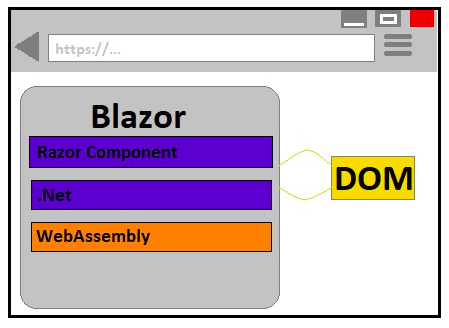
Blazor_framework_01

Server-Side Blazor

Using SignalR pipeline the server-side blazor will retain the model of DOM and transmits the diffs back and forth to the client-side. The server will process the logic and transmit the result back to the client. Whole code will be executed on the server and only UI updates will be exchanged with the client. It doesn’t allow offline mode.
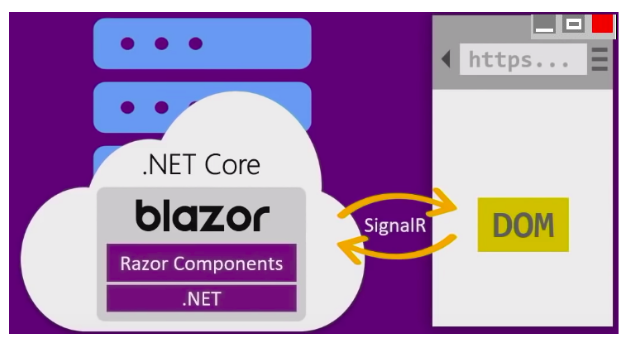
Blazor_framework_02

Counter.Razor

@page "/counter"

<h1>Counter</h1>

<p>Current Count: @currentCount</p>

<button class="btn btn-primary" onClick="IncrementCount">Click me</button>

@code {

int currentCount = 0;

void incrementCount()

{

currentCount++;

}

}

In the above code snippet, the @code section is fully C# code. The @code section contains the properties and methods which are created as part of the component class. The @currentCount binds to the related property of the component. The button element shows how to bind to JavaScript events. As we are prefixing the event with @ results in evaluating the target as C# method instead of JavaScript.


Related Posts

Latest Posts

  • All Posts
  • AI Powered Knowledge
  • ai/ml
  • CEO India Magazine
  • CMMI level 5 Certification
  • e-learning
  • Fintech
  • gaming
  • Generative AI
  • healthcare
  • manufacturing
  • News
  • OTT
  • Portfolio
  • supply chain
  • travel and hospitality
  • Tudip's AI Hackathon
  • Voxlearn Enterprises
    •   Back
    • Android
    • iOS
    • Java
    • PHP
    • MEAN
    • Ruby
    • DotNet
    • IoT
    • Cloud
    • Testing
    • Roku
    • CMS
    • Python
The Future of Workplace Learning: AI-Powered Knowledge on Demand

The Future of Workplace Learning: AI-Powered Knowledge on Demand

June 12, 2026

A few months ago, I was sitting in a meeting with a team lead who looked genuinely frustrated. Not because…

Read More
We Did It Again: Tudip Successfully Renews Its CMMI Level 5 Certification

We Did It Again: Tudip Successfully Renews Its CMMI Level 5 Certification

June 9, 2026

Nobody around here needed a memo to know something worth celebrating had happened. The message from the CMMI Institute said…

Read More
CEO India Magazine Features Dipti Agrawal: The Woman Behind Intelligent Enterprise Solutions

CEO India Magazine Features Dipti Agrawal: The Woman Behind Intelligent Enterprise Solutions

June 9, 2026

There are moments at work that just stop you in your tracks. Not the big quarterly reviews or the product…

Read More

India

Plot No. 11/2, Phase 3, Hinjewadi Rajiv Gandhi Infotech Park, Pune, India – 411057.
info@tudip.com
+91-96-8990-0537

United States

1999 S. Bascom Ave Suite 700, Campbell CA. 95008, USA.
info@tudip.com
+1-408-216-8162

Canada

64 Caracas Road North York, Toronto Ontario M2K 1B1, Canada.
info@tudip.com

Mexico

Calle Amado Nervo #785 Interior B Colonia Ladron De Guevara 44600 Guadalajara, Jalisco, Mexico.
info@tudip.com

Singapore

77 High Street, #10-12B High Street Plaza, Singapore 179433.
info@tudip.com

Colombia

Cra. 9 # 113-53 Of. 1405 Bogotá D.C., Colombia.
info@tudip.com

UAE

Tudip Information Technologies L.L.C Office No 109, ABU HAIL BUILDING 13, Abu Hail, Dubai, UAE.
info@tudip.com

Nigeria

22 Kumasi Crescent, Wuse 2, Abuja, Nigeria.
info@tudip.com





