Let’s understand what app engine basically means and what it does.
What is App Engine?
Google App Engine is a Platform as a Service (PaaS) product that provides access to Google’s scalable hosting. It builds and deploys an application on a fully managed serverless application platform. It provides more infrastructure than other scalable hosting services such as Amazon Elastic Compute Cloud (EC2). It also scales the application seamlessly without having to worry about managing the infrastructure.
Traffic Splitting:
When you are going to launch a new feature in your application, you may want to test it live on production with minimal users to check if they encounter any issues with the new features. This is exactly what traffic splitting does.
Mainly traffic splitting is used to distribute the traffic across two or more of the versions within the service. It also allows us to conduct the A/B testing between versions. Get more details here.
You can decide to split your user traffic across multiple versions of your application at the same time, via an IP address based splitting logic, or via Cookies.
How do I deploy an application in Google App Engine?
Here, we are going to build the simple Python application using the Google Cloud App Engine and see how to update the application by splitting the traffic between the application versions.
First of all, take the clone of the repository to get the codebase of the application for development.
-
Get the source code:
Clone the repository which contains the simple hello world application:
git clone https://github.com/GoogleCloudPlatform/python-docs-samples

cd python-docs-samples/appengine/standard_python37/hello_world
The hello_world folder contains a simple Python application.
This Python app responds to a request with an HTTP header and the message “Hello World!” -
Deploy an App Engine application:
To deploy hello world application run the following gcloud command:
gcloud app deploy app.yaml
Copy the deployed service link from the output and paste it in a new tab. This will open the hello world application.Now your application is deployed, you will make some changes to your App Engine configuration and deploy it again.
-
Update the application files:
Now make a small change to your application’s source code. For this step, return to your Cloud Shell session and open the main.py file with the nano text editor:
nano main.py
Scroll down to the hello function and edit it so it says
"Goodbye world!":

@app.route('/')def hello():""

"Return a friendly HTTP greeting.""

"return 'Goodbye World!’
Press CTRL +x then Y > ENTER to save your changes and exit the nano editor.
-
Deploy the new version of an application:
In Cloud Shell, redeploy the App Engine application using the following gcloud command:
gcloud app deploy app.yaml -v v1
This command will deploy another v1 version of your application.Press ENTER to confirm.In the Console, click Navigation menu > App Engine > Versions.Enable the checkbox for both versions of the application, and click Split traffic.

- Select the radio button to deliver versions randomly.
Configure the traffic split to deliver 50% of traffic to the old version, and 50% to the new version. Click Save.
- Return to the Dashboard, set Version to All versions and click the application link. You should see one version of the application.
- Refresh the homepage a few times.
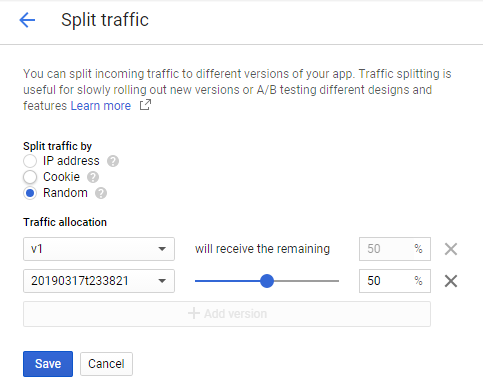
You must see that the homepage displays the old version approximately half the time, and the new version half the time.
You are done! Good job!
For more details about Google Cloud App Engine refer https://cloud.google.com/appengine