Forbes India Leader Recognition
e.preventDefault(); // Prevent form submission input.blur(); // remove focus input.value = ""; // optional: clear the input

Controlling Access In BigQuery

Controlling Access In BigQuery

Featured Image

Bigquery allows us to control which user or group has access to which data in BigQuery. The admin has to give permission by granting roles to a service account/user/group.
Controlling Access In BigQuery

There are three Resource levels in Bigquery:

  • Organization or GCP Project Level
  • Dataset Level
  • Table or View Level

Organization Level: 

This level provides permission to run the BigQuery Jobs and access all of a Project’s BigQuery Resources. When a project is created, BigQuery grants the Owner role to the user who created the project.

Dataset Level: 

In this level, a user/group/service account gets permission to access the tables, views and the table data in a dataset.

Access Controls can be applied after the dataset is created through Cloud Console, Command line tool (bq), API Method, Client Libraries and by using ‘grant’ and ‘revoke’ DCL statements.

Table or View Level: 

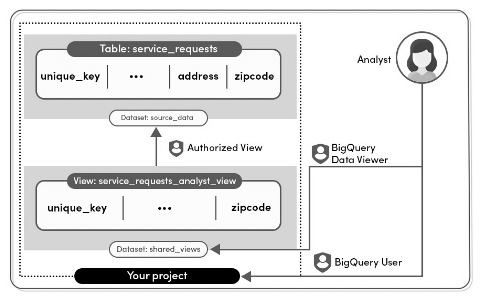
BigQuery allows you to set table-level permissions on tables and views.

Here a user or a group or a service account can access a table or view without having complete access to the entire dataset.

You can use the Access Control Policy through Identity and Access Management Policy.

The default way to give access to a table through the cloud console is by clicking on the table’s schema and sharing the table by adding the members and granting them roles.

Also, if you want to give access to some filtered data, first run the query and then store the results to a new table in a dataset. Later, grant roles to the members you want to give access.

Apart from these access control levels, BigQuery provides row-level security and column-level security as well.

  • In Row-level security,  you can filter the data and enable access to specific rows in a table, based on qualifying user conditions.
    Controlling Access In BigQuery
  • Column-level security, provides fine-grained access to sensitive columns using policy tags, or type-based classification, of data.


Related Posts

Latest Posts

  • All Posts
  • AI Powered Knowledge
  • ai/ml
  • CEO India Magazine
  • CMMI level 5 Certification
  • e-learning
  • Fintech
  • gaming
  • Generative AI
  • healthcare
  • manufacturing
  • News
  • OTT
  • Portfolio
  • supply chain
  • travel and hospitality
  • Tudip's AI Hackathon
  • Voxlearn Enterprises
    •   Back
    • Android
    • iOS
    • Java
    • PHP
    • MEAN
    • Ruby
    • DotNet
    • IoT
    • Cloud
    • Testing
    • Roku
    • CMS
    • Python
The Future of Workplace Learning: AI-Powered Knowledge on Demand

The Future of Workplace Learning: AI-Powered Knowledge on Demand

June 12, 2026

A few months ago, I was sitting in a meeting with a team lead who looked genuinely frustrated. Not because…

Read More
We Built VoXlearn Because Enterprise Training Was Broken: Here’s What We Did About It

We Built VoXlearn Because Enterprise Training Was Broken: Here’s What We Did About It

June 12, 2026

If you’ve ever sat through an end-of-quarter training report and thought, “We spent all that time and money, and this…

Read More
We Did It Again: Tudip Successfully Renews Its CMMI Level 5 Certification

We Did It Again: Tudip Successfully Renews Its CMMI Level 5 Certification

June 9, 2026

Nobody around here needed a memo to know something worth celebrating had happened. The message from the CMMI Institute said…

Read More

India

Plot No. 11/2, Phase 3, Hinjewadi Rajiv Gandhi Infotech Park, Pune, India – 411057.
info@tudip.com
+91-96-8990-0537

United States

1999 S. Bascom Ave Suite 700, Campbell CA. 95008, USA.
info@tudip.com
+1-408-216-8162

Canada

64 Caracas Road North York, Toronto Ontario M2K 1B1, Canada.
info@tudip.com

Mexico

Calle Amado Nervo #785 Interior B Colonia Ladron De Guevara 44600 Guadalajara, Jalisco, Mexico.
info@tudip.com

Singapore

77 High Street, #10-12B High Street Plaza, Singapore 179433.
info@tudip.com

Colombia

Cra. 9 # 113-53 Of. 1405 Bogotá D.C., Colombia.
info@tudip.com

UAE

Tudip Information Technologies L.L.C Office No 109, ABU HAIL BUILDING 13, Abu Hail, Dubai, UAE.
info@tudip.com

Nigeria

22 Kumasi Crescent, Wuse 2, Abuja, Nigeria.
info@tudip.com