


✕
Forbes India Leader Recognition
e.preventDefault(); // Prevent form submission input.blur(); // remove focus input.value = ""; // optional: clear the input

GNU manipulation tools installation and working

GNU manipulation tools installation and working

Featured Image

This blog helps you to install and calculate the image size in the GNU manipulation tool.

Install the Tool GNU Image Manipulation Program in the system , There are two ways to install it on the system.

You can directly search it on Ubuntu softwares as follows and install it.
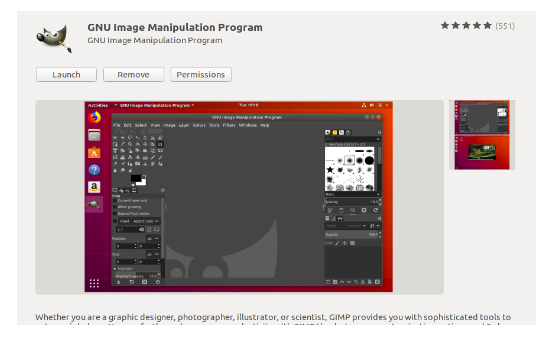
GNU manipulation tools installation and working

We can install it through the terminal by using the following command.

  • sudo add-apt-repository ppa:otto-kesselgulasch/gimp
  • sudo apt-get update
  • sudo apt-get install gimp

Take the snapshot or screenshot of the Playable stream from any video player.

For example we can use the VLC media player to take a snapshot of the screen where we need to find the region.
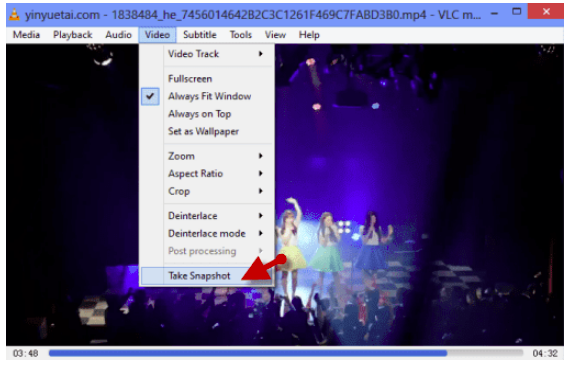
GNU manipulation tools installation and working

Please follow the following formulae to find out the region coordinates for any templates or text.

Region = Region(x , y, Width, Height)

Find out the given coordinates from the frame for the particular image region or the text region.

For example consider the following frame.
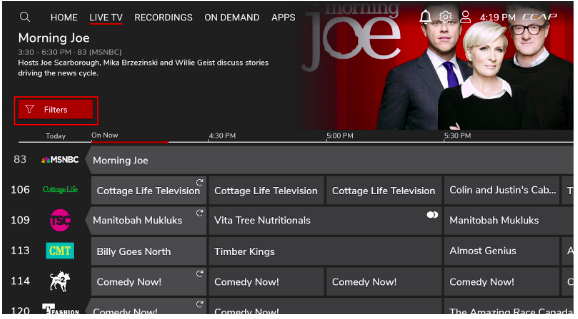
GNU manipulation tools installation and working

We need to find out the region for the highlighted red filters image .

Launch the gnu app and open the given frame.

Select the required portion in the frame and you will get the x and y coordinates for the particular selected region
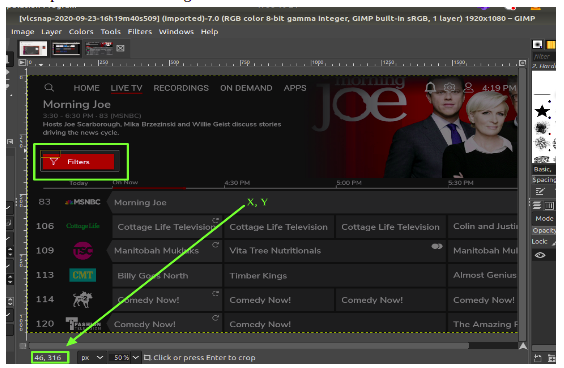
GNU manipulation tools installation and working

We got x = 46 and y = 316

Now we need width and height
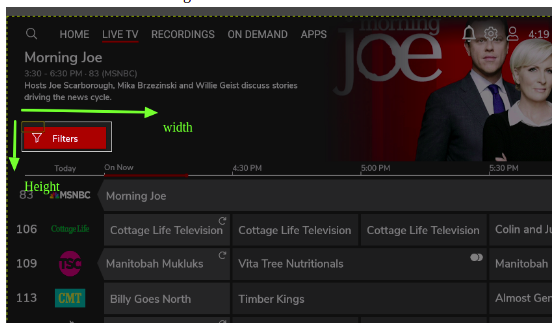
GNU manipulation tools installation and working

Navigate pointer to the right up corner of the image to get width. We will get x1 and y1.

Width = [x 1 - x ] i.e (324-46 = 278)
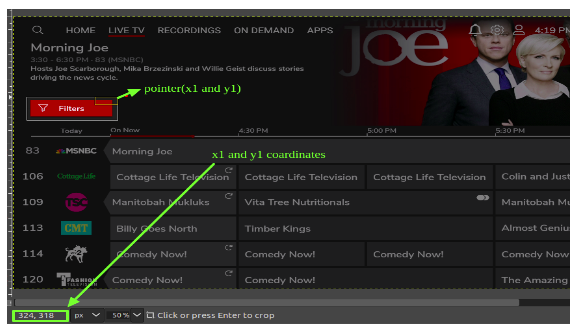
GNU manipulation tools installation and working

Navigate pointer to the Left down corner of the image to get width. We will get x1 and y1 again.

Height = [y 1 - y ] i.e (408-316 = 92)
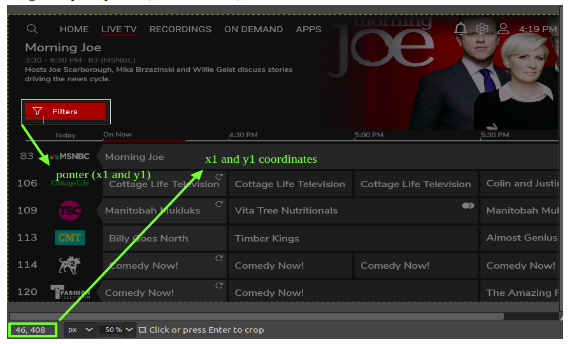
GNU manipulation tools installation and working

We get region =Region (46 ,316 , 278 ,92)

Related Posts

Latest Posts

  • All Posts
  • AI Powered Knowledge
  • ai/ml
  • CEO India Magazine
  • CMMI level 5 Certification
  • e-learning
  • Fintech
  • gaming
  • Generative AI
  • healthcare
  • manufacturing
  • News
  • OTT
  • Portfolio
  • supply chain
  • travel and hospitality
  • Tudip's AI Hackathon
  • Voxlearn Enterprises
    •   Back
    • Android
    • iOS
    • Java
    • PHP
    • MEAN
    • Ruby
    • DotNet
    • IoT
    • Cloud
    • Testing
    • Roku
    • CMS
    • Python
AI Driven Crypto Agility

October 1, 2026

As quantum computing threatens traditional public-key algorithms like RSA and ECC, organizations face immediate "Harvest Now, Decrypt Later" risks. Discover...

AI Driven Crypto Agility

AI Driven Crypto Agility

October 1, 2026

As quantum computing threatens traditional public-key algorithms like RSA and ECC, organizations face immediate "Harvest Now, Decrypt Later" risks. Discover…

Read More
Artificial Intelligence in Healthcare

Artificial Intelligence in Healthcare

September 23, 2026

Explore how artificial intelligence in healthcare is transforming clinical decision-making, and patient care .

Read More
AI in Manufacturing: Machine Intelligence  Meets Industrial Innovation

AI in Manufacturing: Machine Intelligence Meets Industrial Innovation

September 23, 2026

Explore how AI is transforming manufacturing through predictive maintenance, intelligent quality control, data-driven operations.

Read More

India

Plot No. 11/2, Phase 3, Hinjewadi Rajiv Gandhi Infotech Park, Pune, India – 411057.
info@tudip.com
+91-96-8990-0537

United States

1999 S. Bascom Ave Suite 700, Campbell CA. 95008, USA.
info@tudip.com
+1-408-216-8162

Canada

64 Caracas Road North York, Toronto Ontario M2K 1B1, Canada.
info@tudip.com

Mexico

Calle Amado Nervo #785 Interior B Colonia Ladron De Guevara 44600 Guadalajara, Jalisco, Mexico.
info@tudip.com

Singapore

77 High Street, #10-12B High Street Plaza, Singapore 179433.
info@tudip.com

Colombia

Cra. 9 # 113-53 Of. 1405 Bogotá D.C., Colombia.
info@tudip.com

UAE

Tudip Information Technologies L.L.C Office No 109, ABU HAIL BUILDING 13, Abu Hail, Dubai, UAE.
info@tudip.com

Germany

U.K.