Introduction:
Cloud function is a Google Cloud service which helps us to connect to the different services and the application of the Google Cloud. As general we write the function in order to reduce the complexity of the code and by calling as we need to process the specific data. Similarly the cloud function is the Google Cloud is used to call the specific services and use as we want.
Cloud Functions is Google Cloud’s event-driven, serverless platform that offers flexible, fast cloud app development. Cloud function is used to provide the fast way to build the application with less amount of space.
As the cloud function is serverless and the developer doesn’t need anything heavy infrastructure to worry about the application. use for the Cloud Functions can be written in Node.js, Python, Go, Java, .NET, Ruby, and PHP programming languages, and are executed in language-specific runtimes.
The Cloud Functions execution environment varies by your chosen runtime.There are two distinct types of Cloud Functions: HTTP functions and event-driven functions.
The HTTP response and support handling of common http requests method. Once we use the cloud function the TLS certificate is provided so it will get secure.
The event driven functions are used when some changes are happening in the Google Cloud like adding the image in bucket or any VM gets down due to high load then the event gets triggered with the help of those changes we can manage to resolve the failure in the cloud.
How to Use:
- To use the cloud function we need to be unable to access the API of the cloud function by navigating to the API and services. Once we click on the enable the service is available for us.
- We can search the cloud function and once the cloud function is open we can provide the name, size and the trigger methods. You can add the source code with the help of an inline editor or you can upload the file or use cloud repository.
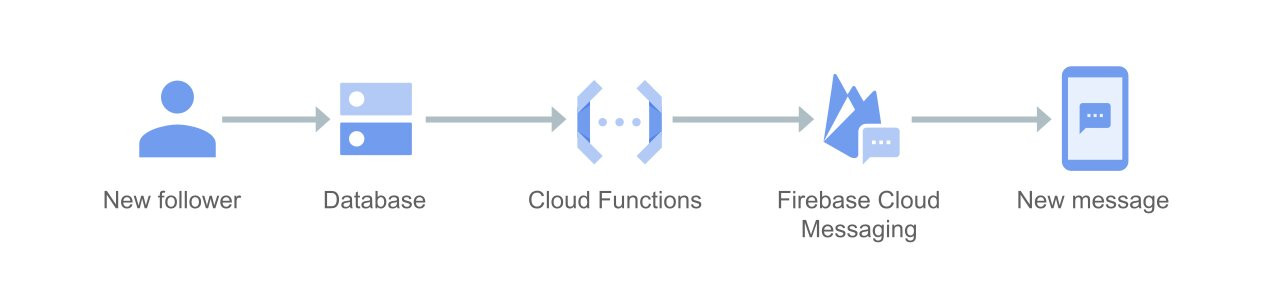
- As the cloud function supports different languages you can choose the language you want to use. We can allocate the memory, time it take to execute the function. After that you can provide the name to the function to execute. Now, once we click on the create function the function is created.
- In this case every function acts like a single service. If you want services with small functionality then we can use the cloud function. As in the app engine you can create the whole application.
- Whereas in the cloud function you can create the small services for the application. As the cloud function service is run only for a few minutes because it’s serverless and contains less time.