

✕
Forbes India Leader Recognition
e.preventDefault(); // Prevent form submission input.blur(); // remove focus input.value = ""; // optional: clear the input

How to implement Chart.js in Angular

How to implement Chart.js in Angular

Featured Image

Chart.js is an open source JavaScript library that makes it easy to include charts in your website. The charts are animated and responsive so we can show it on any device. If you want to combine Chart.js with Angular then we can use: ng2-chart. Adding this package gives you access to angular instructions so that you can use the Chart.js library.

Installation

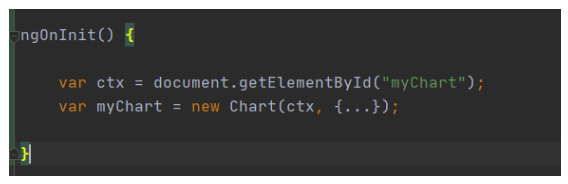
To create a chart, we must immediately create a chart class. To do this, we have to pass a node, jQuery instance, or 2d reference on the canvas where we want to draw the chart. Here’s an example.

You can implement the chart in a simple way with the following instructions:

  1. If you do not have an existing project then create a new project with angular-cli.
    ng new example-chartjs
  2. Install Chart.js in your Angular project
    npm install chart.js --save
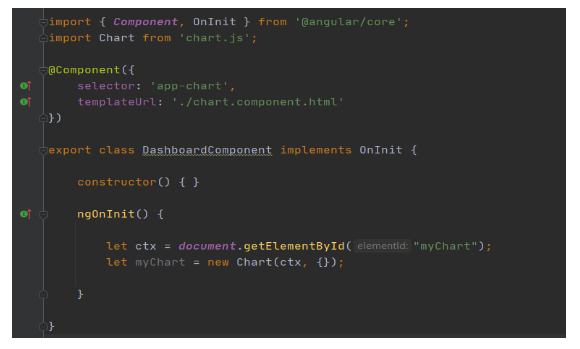
  3. Import Chart into its component
    import Chart from 'chart.js';
  4. Use Chart in your html file and component file.

In your html file

How to implement Chart.js in Angular

In your component file:

How to implement Chart.js in Angular

The component should look similar to the following:
How to implement Chart.js in Angular

Adding Bootstrap

On this we are going to use some CSS classes of bootstrap, so we have to install bootstrap before that by using the following command.

$ npm install bootstrap

Also be sure to add the following line of code to the styles to include Bootstrap’s CSS file.

@import '~bootstrap/dist/css/bootstrap.min.css';

Importing ChartsModule

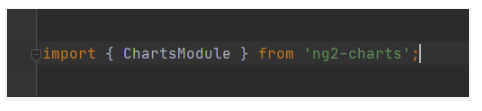
We need to import the ChartsModule so that we can use ng2-chart directives in our angular application. We can add the following line on the app.module.ts file to import the ChartsModule.
How to implement Chart.js in Angular

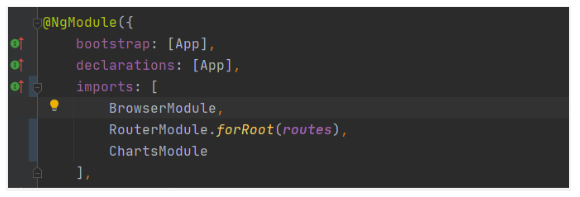
Also make sure to add ChartsModule to the import array of @NgModule decorator:
How to implement Chart.js in Angular

Adding Basic HTML Structure

Let’s add a base HTML structure (including tab navigation) to app.component.html:
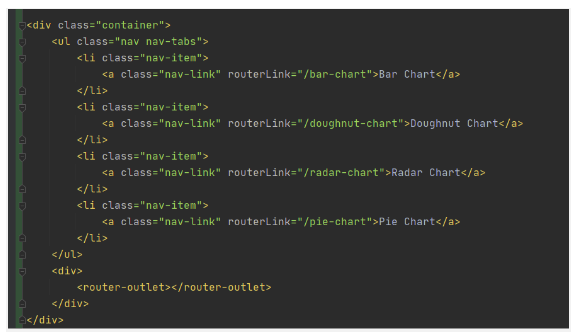
How to implement Chart.js in Angular

Conclusion

That’s it, we just implemented the chart js library in our angular project by using the ng2-charts package and created various types of charts like line, bar, pie, doughnut, etc. We can easily represent simple data in graphical UI charts using chartJs. You can get more information in the official Chart.js and ng2-charts documentation.


 

Related Posts

Latest Posts

  • All Posts
  • AI Powered Knowledge
  • ai/ml
  • CEO India Magazine
  • CMMI level 5 Certification
  • e-learning
  • Fintech
  • gaming
  • Generative AI
  • healthcare
  • manufacturing
  • News
  • OTT
  • Portfolio
  • supply chain
  • travel and hospitality
  • Tudip's AI Hackathon
  • Voxlearn Enterprises
    •   Back
    • Android
    • iOS
    • Java
    • PHP
    • MEAN
    • Ruby
    • DotNet
    • IoT
    • Cloud
    • Testing
    • Roku
    • CMS
    • Python
AI Driven Crypto Agility

October 1, 2026

As quantum computing threatens traditional public-key algorithms like RSA and ECC, organizations face immediate "Harvest Now, Decrypt Later" risks. Discover...

AI Driven Crypto Agility

AI Driven Crypto Agility

October 1, 2026

As quantum computing threatens traditional public-key algorithms like RSA and ECC, organizations face immediate "Harvest Now, Decrypt Later" risks. Discover…

Read More
Artificial Intelligence in Healthcare

Artificial Intelligence in Healthcare

September 23, 2026

Explore how artificial intelligence in healthcare is transforming clinical decision-making, and patient care .

Read More
AI in Manufacturing: Machine Intelligence  Meets Industrial Innovation

AI in Manufacturing: Machine Intelligence Meets Industrial Innovation

September 23, 2026

Explore how AI is transforming manufacturing through predictive maintenance, intelligent quality control, data-driven operations.

Read More

India

Plot No. 11/2, Phase 3, Hinjewadi Rajiv Gandhi Infotech Park, Pune, India – 411057.
info@tudip.com
+91-96-8990-0537

United States

1999 S. Bascom Ave Suite 700, Campbell CA. 95008, USA.
info@tudip.com
+1-408-216-8162

Canada

64 Caracas Road North York, Toronto Ontario M2K 1B1, Canada.
info@tudip.com

Mexico

Calle Amado Nervo #785 Interior B Colonia Ladron De Guevara 44600 Guadalajara, Jalisco, Mexico.
info@tudip.com

Singapore

77 High Street, #10-12B High Street Plaza, Singapore 179433.
info@tudip.com

Colombia

Cra. 9 # 113-53 Of. 1405 Bogotá D.C., Colombia.
info@tudip.com

UAE

Tudip Information Technologies L.L.C Office No 109, ABU HAIL BUILDING 13, Abu Hail, Dubai, UAE.
info@tudip.com

Germany

U.K.