
What is Getstream.io?
What is the best way to interact with the live data in the application? Yes, the answer is through FEEDS or CHAT.
FEEDS or CHAT are the best way to be in touch with the people you care about.
However, the user expects the feeds to be more Relevant, Engaging and Fast.
Getting the relevant posts for a user by building a relational database is a lot more time consuming and difficult to maintain for large applications.
Gestream Activity Feeds is the best solution for building applications like Facebook, Instagram and Twitter.
Basically, any requirement where the user can follow things or people to get the best contents in which they are interested in is the best-fit Getstream.io
Getstream allows users to follow the topics or users of their interest and get the posts from them on their timeline.
What is STI – Single Table Inheritance?
When there is a case where you want to store the data into a single table but should have multiple subclasses sharing a single base class, then STI is the best fit for you.
In short, many subclasses inherit from a single base class storing the data in a single table. This is achieved with the help of the “Type” column in the base class.
We will have to add a type column in the base class, which tells rails that we are using STI. Any common validation we want to apply will be in the base class and the specific validations will be in a required subclass.
Implementing Getstream.io with STI
Let’s take a real-world example, where a user can create a post that can include an image, video, blog, audio etc. and all the posts will be stored in a single table called posts.
To achieve this, we will start with implementing STI for multiple types of posts and Getstream.io for getting the user feeds on the timeline.
First, we will start with creating a posts model and adding a type column to the posts table.
Our post model will look like this:

Then we will create some subclasses for other types of posts like image, video, audio.
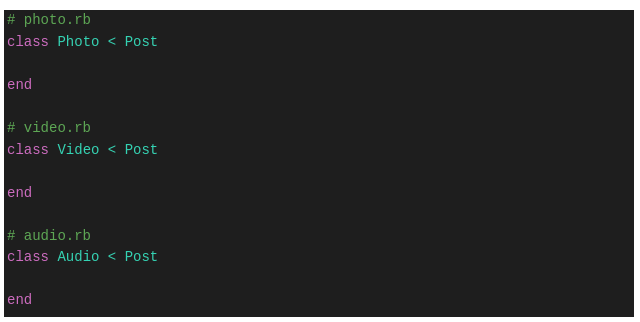
The post table has a ‘type’ column and others are the subclasses derived from the post base class. Any common validation that we want to apply on post will be in post.rb and other post type-specific validations will be in the respective model.
We will have separate controllers and routes for creating all types of posts. You can define the routes like this:

We are all set with our STI structure and now the posts table will have a column type that will indicate the type of post. This will happen when we insert data into the posts table using Photo.new() or Video.new or Audio.new()
This way the type column will have values like “Photo” or “Video” or “Audio” depending on the type of post we create.
Here we are able to create three types of posts having different models derived from a single base class i.e post.rb
In the next step, we will implement the Getstream.io to get the feeds using the Stream Rails gem.
Official site and documentation for Getstream:
Official site and documentation for Stream Rails gem:
First, we will have to follow the steps given in the link below this link.
- Install the stream_rails gem:
gem install stream_rails
- Setting up the Getstream:
Add a new file at config/initializers/stream_rails.rb with following content:
 To get the api key and secret key, we will have to log in to https://getstream.io/ and get the credentials.
 - Model configuration:
Now as we are using STI for our posts, we have our base class called post.rb and instead of adding each post type to the stream, we will integrate our base class i.e post.rb with the stream.Add following code to post.rbinclude StreamRails::Activity as_activity def activity_object self end
Our post model will look like this:
Now whenever we create a post, it will get stored into the feeds for that user and will be deleted from feeds once the post is deleted.
 To get the api key and secret key, we will have to log in to
Now we are all set with integrating Getstream.io with our STI implementation.
There are few important concepts of Activity feeds:
- Activity_object: The object of ActiveRecord model instance stored into the feed.
- Activity_actor: The user who created that post.
- Activity_verb: Model class name of the verb i.e Photo/Video/Audio.
We are able to insert into feeds whenever the post is created. But what about getting them back and displaying them on the user’s timeline?
Stream_rails provides the Feed Manager using which we can fetch the activities from the feeds.
There are various types of feeds present in the Feed Manager.
- User Feed:
Stores all the activities of the currentuserfeed = StreamRails.feed_manager.get_user_feed(user.id)
- News Feed:
Feeds from the people you follow.feed = StreamRails.feed_manager.get_news_feeds(current_user.id)[:flat] aggregated_feed = StreamRails.feed_manager.get_news_feeds(current_user.id)[:aggregated]
- Notification Feed:
Feeds to build a notification systemnotification_feed = StreamRails.feed_manager.get_notification_feed(current_user.id)
This is how we can build the activity application with user feeds using the rails Single Table Inheritance and Getstream.io