Forbes India Leader Recognition
e.preventDefault(); // Prevent form submission input.blur(); // remove focus input.value = ""; // optional: clear the input

Migrate TestFlight App to iTunesConnect

Migrate TestFlight App to iTunesConnect

Featured Image
As we all know that testflightapp.com will shutdown on 02/26/2015 so we have to move all our team’s contact information to itunesconnect.apple.com so please follow mentioned steps below:

  • Steps for TestFlightapp.com
    • Sign in to the TestFlight Dashboard at testflightapp.com TestFlight to iTunesConnect
    • Choose your team from the list teams from right-top corner dropdown.  TestFlight to iTunesConnect
    • Navigate to the “People” tab which shows the list of teammates TestFlight to iTunesConnect
    • Select the teammates you would like to export for adding them to iTunesConnect  TestFlight to iTunesConnect
    • Open the “Actions” menu on the right side of the teammates list and click on “Export Contact Info” to download the exported CSV file. TestFlight to iTunesConnect
    • Save the export in the some folder in your system.
  • Step for iTunesConnect
    1. Sign in to iTunes Connect at itunesconnect.apple.com TestFlight to iTunesConnectTestFlight to iTunesConnect
    2. Click “My Apps” TestFlight to iTunesConnect
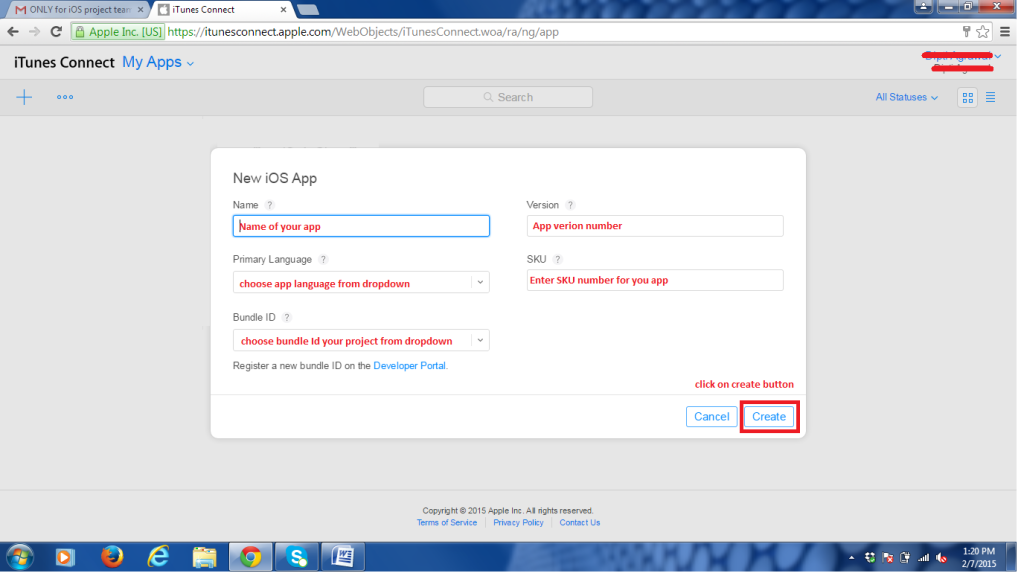
    3. Create your new app and fill in all details, choose bundle Id from drop down and click on create.  TestFlight to iTunesConnect
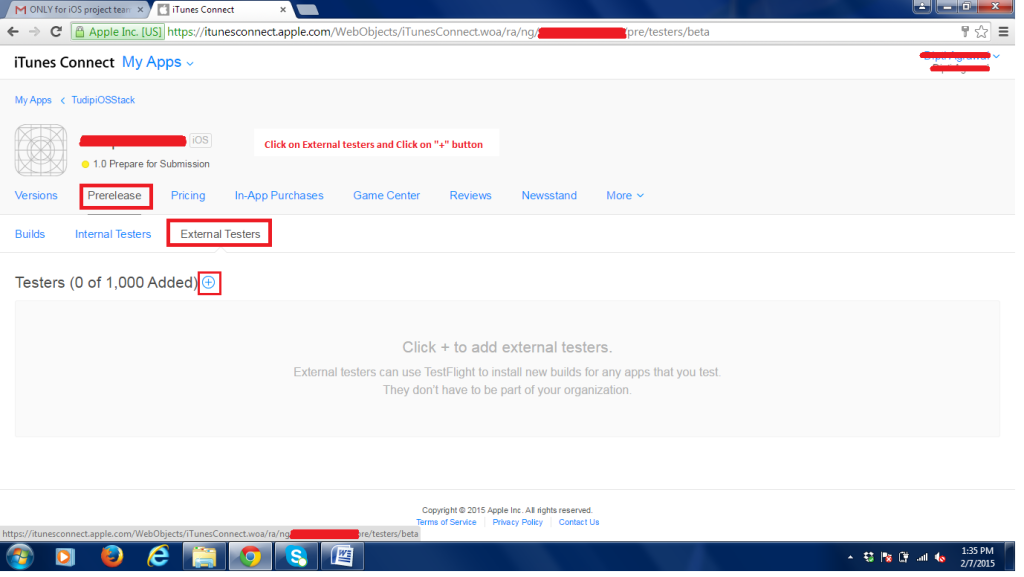
    4. Enter the “Prerelease” tab and select “External Testers” and Click the plus sign to add new external testers. TestFlight to iTunesConnect
    5. Use the “Import File” from the “Add New External Testers” page to upload the exported CSV file. TestFlight to iTunesConnect
    6. After completion of importing the list, it will be shown as below. TestFlight to iTunesConnect

Related Posts

Latest Posts

  • All Posts
  • AI Powered Knowledge
  • ai/ml
  • CEO India Magazine
  • CMMI level 5 Certification
  • e-learning
  • Fintech
  • gaming
  • Generative AI
  • healthcare
  • manufacturing
  • News
  • OTT
  • Portfolio
  • supply chain
  • travel and hospitality
  • Tudip's AI Hackathon
  • Voxlearn Enterprises
    •   Back
    • Android
    • iOS
    • Java
    • PHP
    • MEAN
    • Ruby
    • DotNet
    • IoT
    • Cloud
    • Testing
    • Roku
    • CMS
    • Python
The Future of Workplace Learning: AI-Powered Knowledge on Demand

The Future of Workplace Learning: AI-Powered Knowledge on Demand

June 12, 2026

A few months ago, I was sitting in a meeting with a team lead who looked genuinely frustrated. Not because…

Read More
We Built VoXlearn Because Enterprise Training Was Broken: Here’s What We Did About It

We Built VoXlearn Because Enterprise Training Was Broken: Here’s What We Did About It

June 12, 2026

If you’ve ever sat through an end-of-quarter training report and thought, “We spent all that time and money, and this…

Read More
We Did It Again: Tudip Successfully Renews Its CMMI Level 5 Certification

We Did It Again: Tudip Successfully Renews Its CMMI Level 5 Certification

June 9, 2026

Nobody around here needed a memo to know something worth celebrating had happened. The message from the CMMI Institute said…

Read More

India

Plot No. 11/2, Phase 3, Hinjewadi Rajiv Gandhi Infotech Park, Pune, India – 411057.
info@tudip.com
+91-96-8990-0537

United States

1999 S. Bascom Ave Suite 700, Campbell CA. 95008, USA.
info@tudip.com
+1-408-216-8162

Canada

64 Caracas Road North York, Toronto Ontario M2K 1B1, Canada.
info@tudip.com

Mexico

Calle Amado Nervo #785 Interior B Colonia Ladron De Guevara 44600 Guadalajara, Jalisco, Mexico.
info@tudip.com

Singapore

77 High Street, #10-12B High Street Plaza, Singapore 179433.
info@tudip.com

Colombia

Cra. 9 # 113-53 Of. 1405 Bogotá D.C., Colombia.
info@tudip.com

UAE

Tudip Information Technologies L.L.C Office No 109, ABU HAIL BUILDING 13, Abu Hail, Dubai, UAE.
info@tudip.com

Nigeria

22 Kumasi Crescent, Wuse 2, Abuja, Nigeria.
info@tudip.com