


Forbes India Leader Recognition
e.preventDefault(); // Prevent form submission input.blur(); // remove focus input.value = ""; // optional: clear the input

Quill Text-Editor Implementation in ASP.NET

Quill Text-Editor Implementation in ASP.NET

Featured Image

What is Quill?

  • Quill is a free, open-source modern rich text editor built for the modern web application. With its descriptive API and modular configuration, it is completely customizable to fit any need.
  • It was known for its compatibility and extensibility. It was created by Jason Chen and Byron Milligan and maintained by Slab in some sort of time-interval.

Key Features

  • Quill allows us to customize the options used for the text editor according to our needs.
  • Quill is known for its flexibility and extensibility.

How to implement Quill?

Step1:

Include Quill.js and Quill.snow.css to an HTML:
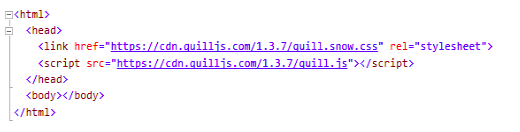
Quill Text-Editor Implementation in ASP.NET

Step2:

Add a “div” tag with the “id” attribute and assign some name to it and include it inside a “body” tag with some static height. This is the place where our rich text-editor is going to display on the user interface.

Quill Text-Editor Implementation in ASP.NETStep3:

Now add a script section in the style tag and here create a new object of the quill and then add the id of the div in which we defined our editor to display
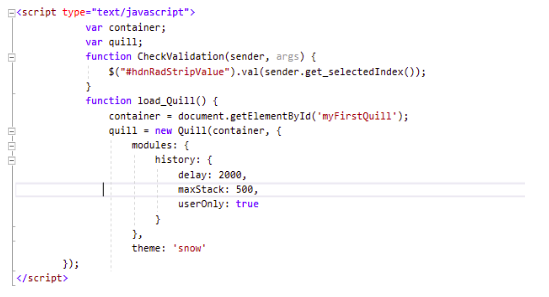
Quill Text-Editor Implementation in ASP.NET

Step4:

Here is the view of the implemented quill editor
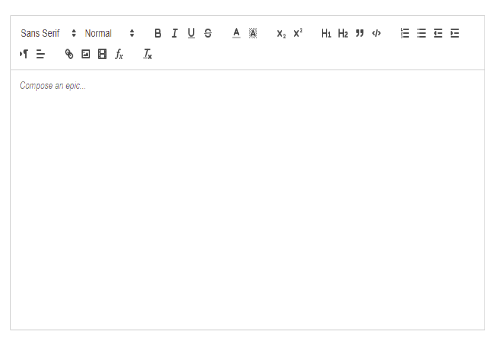
Quill Text-Editor Implementation in ASP.NET

Various API used in Quill-Implementation

  • Content
  • Formatting
  • Selection
  • Editor
  • Events
  • Model
  • Extension

Followings are the function comes under each API group for the various purpose:
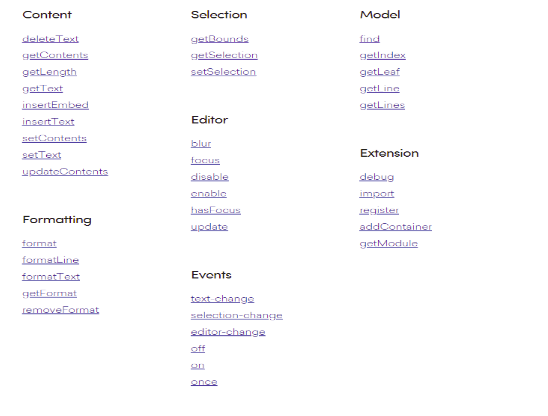
Quill Text-Editor Implementation in ASP.NET

Customization of the editor

Create a toolbar with font-size, font color, and background color:
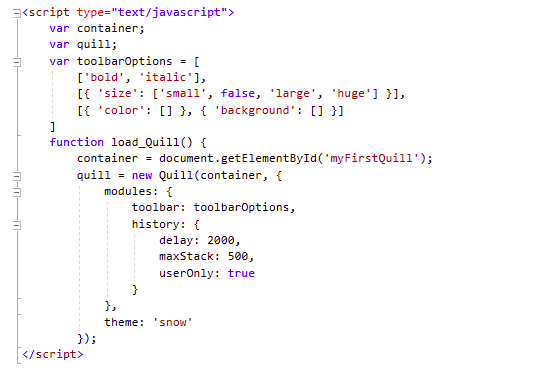
Quill Text-Editor Implementation in ASP.NET

Modules in Quill

  • Toolbar
  • Keyboard
  • History
  • Clipboard
  • Syntax

Modules make quill’s behavior and functionality customized. There are various officially supported modules available to use while implementing it.
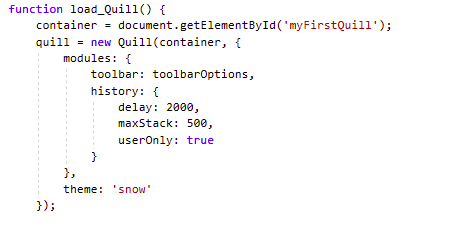
Quill Text-Editor Implementation in ASP.NET

Themes in Quill

  • It allows us to make our editor look attractive and interactive as well with minimal effort in no time
  • There are two types of officially supported themes available in quill:
    • Snow: It’s a clean flat toolbar theme
      Quill Text-Editor Implementation in ASP.NET
    • Bubble: It’s a simple tooltip based theme
      Quill Text-Editor Implementation in ASP.NET

Summary

In this article, we got to know about the various new things like API, modules, themes supported by the quill.js. It also provides a good overview of the customization of the quill editor by modifying the content of the module according to our needs.


Related Posts

Latest Posts

  • All Posts
  • AI Powered Knowledge
  • ai/ml
  • CEO India Magazine
  • CMMI level 5 Certification
  • e-learning
  • Fintech
  • gaming
  • Generative AI
  • healthcare
  • manufacturing
  • News
  • OTT
  • Portfolio
  • supply chain
  • travel and hospitality
  • Tudip's AI Hackathon
  • Voxlearn Enterprises
    •   Back
    • Android
    • iOS
    • Java
    • PHP
    • MEAN
    • Ruby
    • DotNet
    • IoT
    • Cloud
    • Testing
    • Roku
    • CMS
    • Python
The Future of Workplace Learning: AI-Powered Knowledge on Demand

The Future of Workplace Learning: AI-Powered Knowledge on Demand

June 12, 2026

A few months ago, I was sitting in a meeting with a team lead who looked genuinely frustrated. Not because…

Read More
We Did It Again: Tudip Successfully Renews Its CMMI Level 5 Certification

We Did It Again: Tudip Successfully Renews Its CMMI Level 5 Certification

June 9, 2026

Nobody around here needed a memo to know something worth celebrating had happened. The message from the CMMI Institute said…

Read More
CEO India Magazine Features Dipti Agrawal: The Woman Behind Intelligent Enterprise Solutions

CEO India Magazine Features Dipti Agrawal: The Woman Behind Intelligent Enterprise Solutions

June 9, 2026

There are moments at work that just stop you in your tracks. Not the big quarterly reviews or the product…

Read More

India

Plot No. 11/2, Phase 3, Hinjewadi Rajiv Gandhi Infotech Park, Pune, India – 411057.
info@tudip.com
+91-96-8990-0537

United States

1999 S. Bascom Ave Suite 700, Campbell CA. 95008, USA.
info@tudip.com
+1-408-216-8162

Canada

64 Caracas Road North York, Toronto Ontario M2K 1B1, Canada.
info@tudip.com

Mexico

Calle Amado Nervo #785 Interior B Colonia Ladron De Guevara 44600 Guadalajara, Jalisco, Mexico.
info@tudip.com

Singapore

77 High Street, #10-12B High Street Plaza, Singapore 179433.
info@tudip.com

Colombia

Cra. 9 # 113-53 Of. 1405 Bogotá D.C., Colombia.
info@tudip.com

UAE

Tudip Information Technologies L.L.C Office No 109, ABU HAIL BUILDING 13, Abu Hail, Dubai, UAE.
info@tudip.com

Nigeria

22 Kumasi Crescent, Wuse 2, Abuja, Nigeria.
info@tudip.com





