

✕
Forbes India Leader Recognition
e.preventDefault(); // Prevent form submission input.blur(); // remove focus input.value = ""; // optional: clear the input

SharePoint Framework (SPFx) Overview

SharePoint Framework (SPFx) Overview

Featured Image

What is SharePoint Framework (SPFx)?

The Sharepoint Framework provides facility for client side development on the SharePoint platform. SharePoint Framework provides support for web technologies to build responsive apps. This framework allows easy integration with SharePoint Data.

The main purpose of using the SharePoint Framework is to be able to customize the modern sites. It is a Page and Web-Part based model.

Why to use SharePoint Framework (SPFx)?

The Existing SharePoint doesn’t do well with multiple enterprises. It can’t scale to the cloud where multiple enterprises run on the same server. So, to achieve this there are two alternatives. The first one is JavaScript Injection in SPFx in which the script editor is used in SharePoint online. It can use JavaScript and JavaScript executes while the page is rendering. As it is in the same DOM, one control can interact with other controls easily. The other option is an add-in model in SharePoint. It allows you to create an iFrame to execute. It is external and has no access to DOM and connection. The disadvantage of using add-ins is that it uses iFrames which is slower than the script editor.

Features of SharePoint Framework (SPFx):

  1. Faster Rendering
  2. Not dependent on the framework used for JavaScript.
  3. It is Safe and Secure, and needs access/permission for making changes.
  4. Provides responsive controls.
  5. Provides Open Source development tools.
  6. Provides reliable performance

SharePoint Framework (SPFx) Extensions:

SPFx Extensions extends the SharePoint user experience. While using SPFx tools and libraries for development is uses following extension types:

Application Customizers:

It adds scripts to the page, accessed HTML elements

Field Customizers:

Provides access to modified views to data for fields within a list.

Command Sets:

Adds new commands to SharePoint command commands.
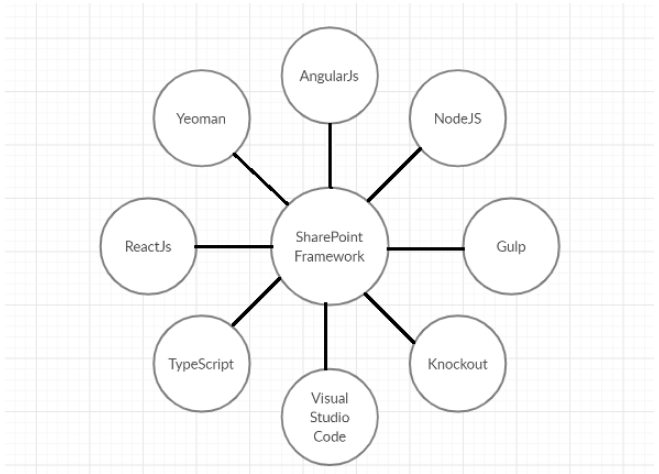
SharePoint Framework (SPFx)

To have the development environment ready for SPFx following steps are required

  1. Install Latest Version of Node Js
  2. Install Code Editor (Visual Studio Code/Atom/WebStorm/Visual Studio SPFx Project Template)
  3. Install Yeoman and gulp
  4. Update NPM packages if outdated.

Related Posts

Latest Posts

  • All Posts
  • AI Powered Knowledge
  • ai/ml
  • CEO India Magazine
  • CMMI level 5 Certification
  • e-learning
  • Fintech
  • gaming
  • Generative AI
  • healthcare
  • manufacturing
  • News
  • OTT
  • Portfolio
  • supply chain
  • travel and hospitality
  • Tudip's AI Hackathon
  • Voxlearn Enterprises
    •   Back
    • Android
    • iOS
    • Java
    • PHP
    • MEAN
    • Ruby
    • DotNet
    • IoT
    • Cloud
    • Testing
    • Roku
    • CMS
    • Python
Artificial Intelligence in Healthcare

Artificial Intelligence in Healthcare

September 23, 2026

Explore how artificial intelligence in healthcare is transforming clinical decision-making, and patient care .

Read More
AI in Manufacturing: Machine Intelligence  Meets Industrial Innovation

AI in Manufacturing: Machine Intelligence Meets Industrial Innovation

September 23, 2026

Explore how AI is transforming manufacturing through predictive maintenance, intelligent quality control, data-driven operations.

Read More
Artificial Intelligence in Manufacturing: Enabling Intelligent, Flexible and Cost-Effective Production Through AI

Artificial Intelligence in Manufacturing: Enabling Intelligent, Flexible and Cost-Effective Production Through AI

September 23, 2026

Discover how AI is transforming manufacturing through intelligent automation.

Read More

India

Plot No. 11/2, Phase 3, Hinjewadi Rajiv Gandhi Infotech Park, Pune, India – 411057.
info@tudip.com
+91-96-8990-0537

United States

1999 S. Bascom Ave Suite 700, Campbell CA. 95008, USA.
info@tudip.com
+1-408-216-8162

Canada

64 Caracas Road North York, Toronto Ontario M2K 1B1, Canada.
info@tudip.com

Mexico

Calle Amado Nervo #785 Interior B Colonia Ladron De Guevara 44600 Guadalajara, Jalisco, Mexico.
info@tudip.com

Singapore

77 High Street, #10-12B High Street Plaza, Singapore 179433.
info@tudip.com

Colombia

Cra. 9 # 113-53 Of. 1405 Bogotá D.C., Colombia.
info@tudip.com

UAE

Tudip Information Technologies L.L.C Office No 109, ABU HAIL BUILDING 13, Abu Hail, Dubai, UAE.
info@tudip.com

Nigeria

22 Kumasi Crescent, Wuse 2, Abuja, Nigeria.
info@tudip.com